 Approvals


- The full AI Sales & CRM Office
- $20 Clocot credit
Working prototype ·AI Sales & CRM Office founding round open until November 8, 2026. The wider Clocot production platform follows in early 2027.
Founding round · limited places · access opens November 8, 2026
For B2B companies that win business by writing to other companies
“Find me 2,000 new customers.” Say it once. Your AI sales team takes it from there.
The Sales Director turns your sentence into a plan. The team researches, writes from your own mailboxes, sorts every answer and prepares each reply for you to send, all inside a complete CRM.
From $36.67 a month, fixed for life · Full refund until you start using it · Paid through Stripe
The founding round closes in--days--hours--minLimited places
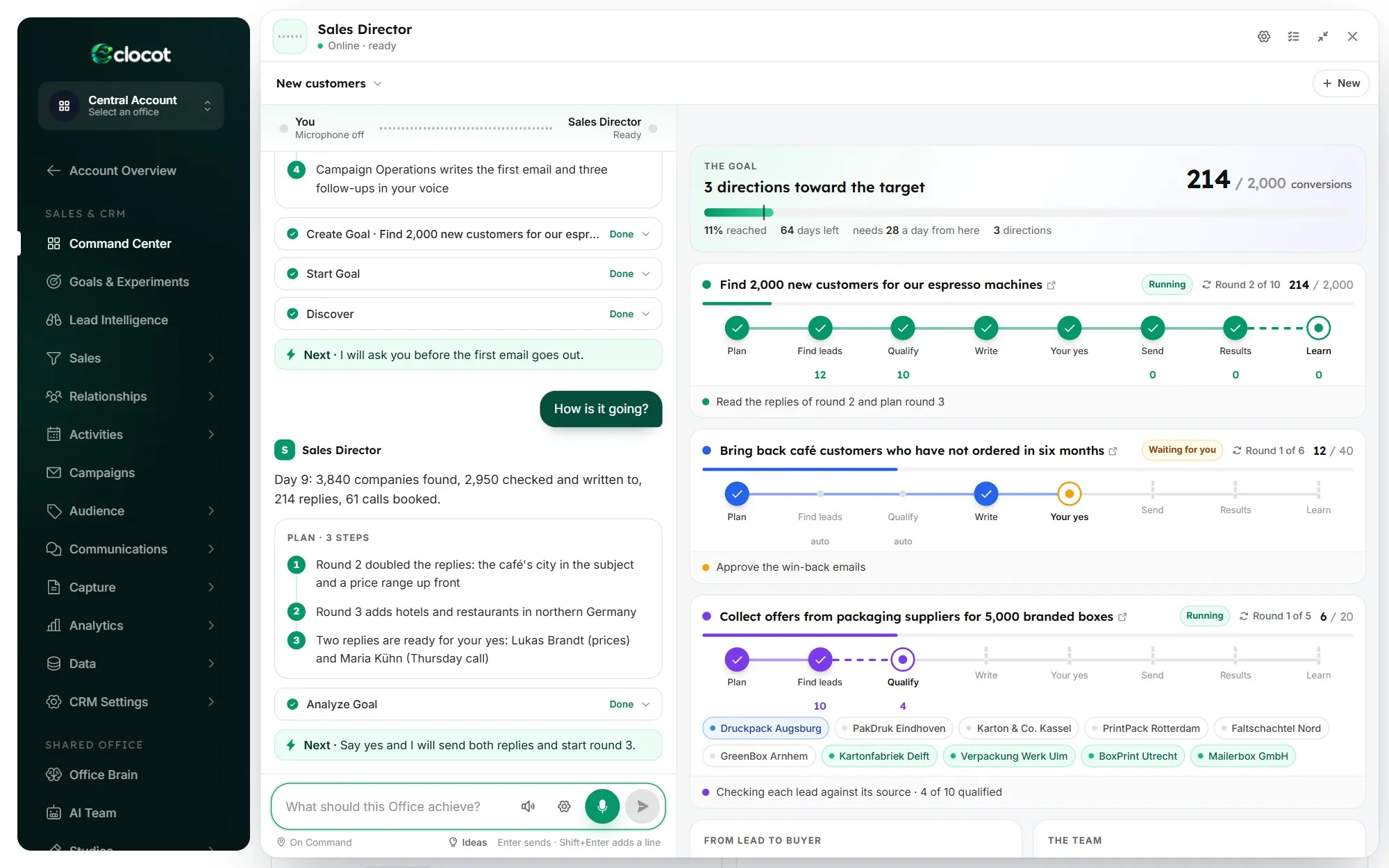
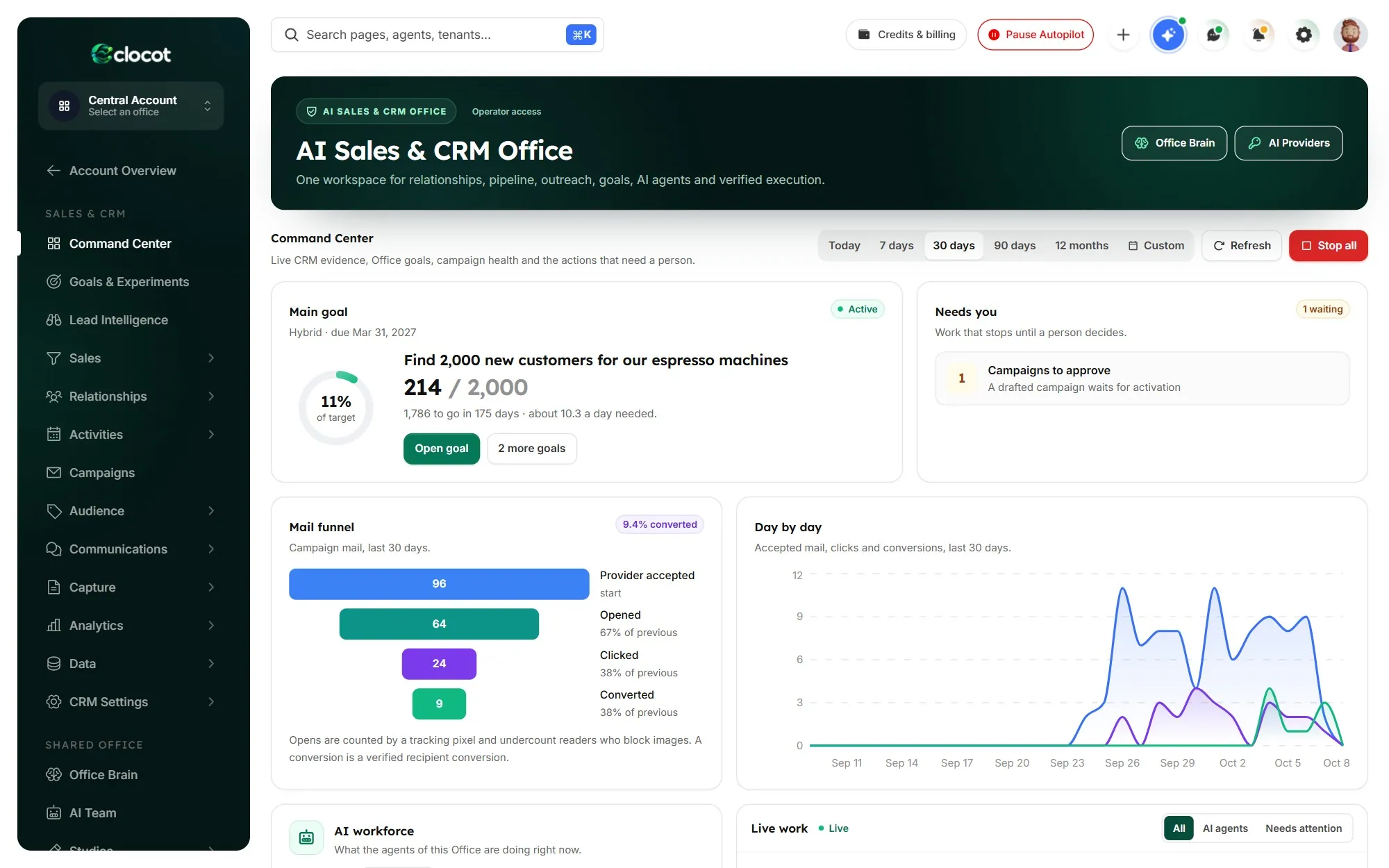
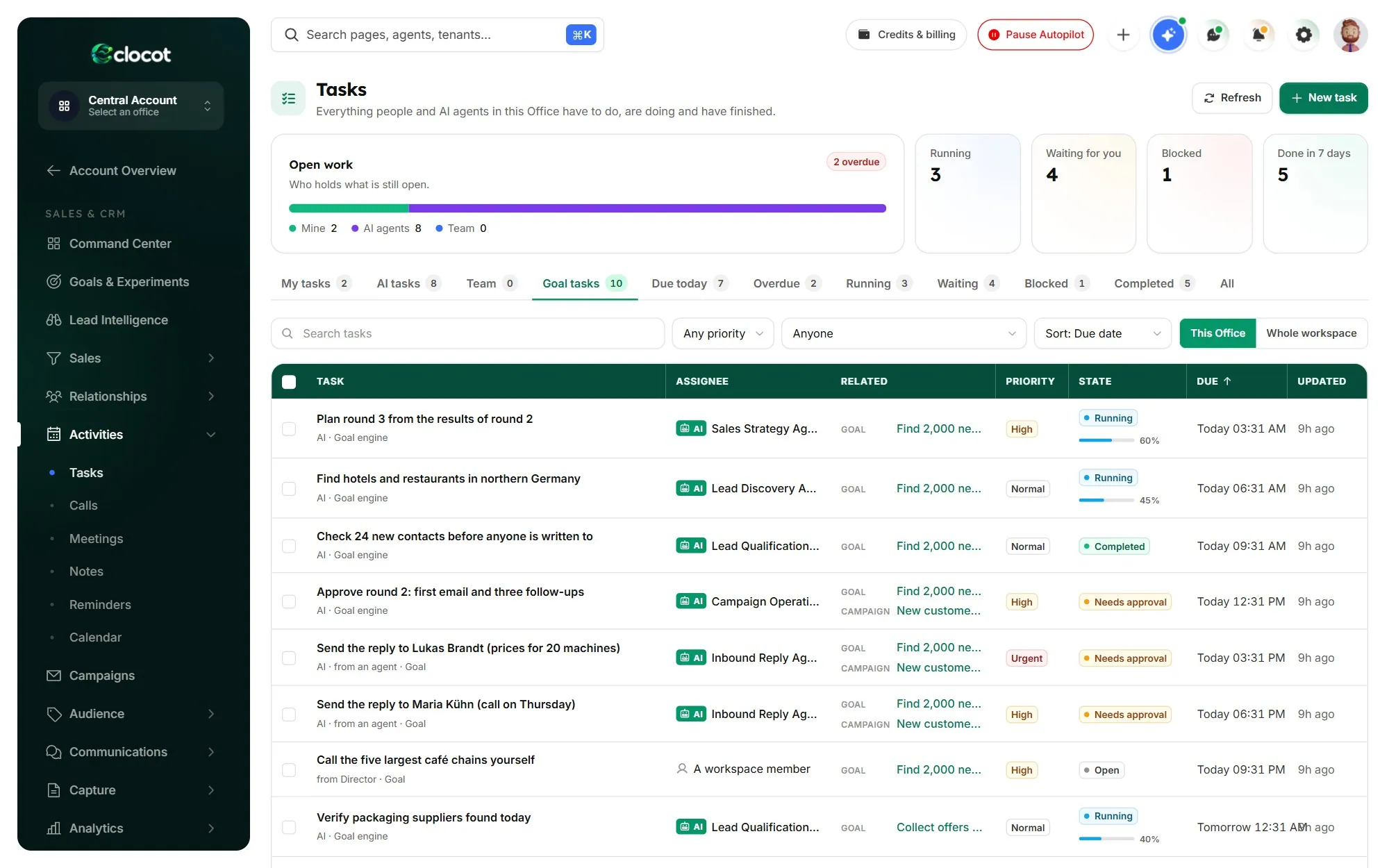
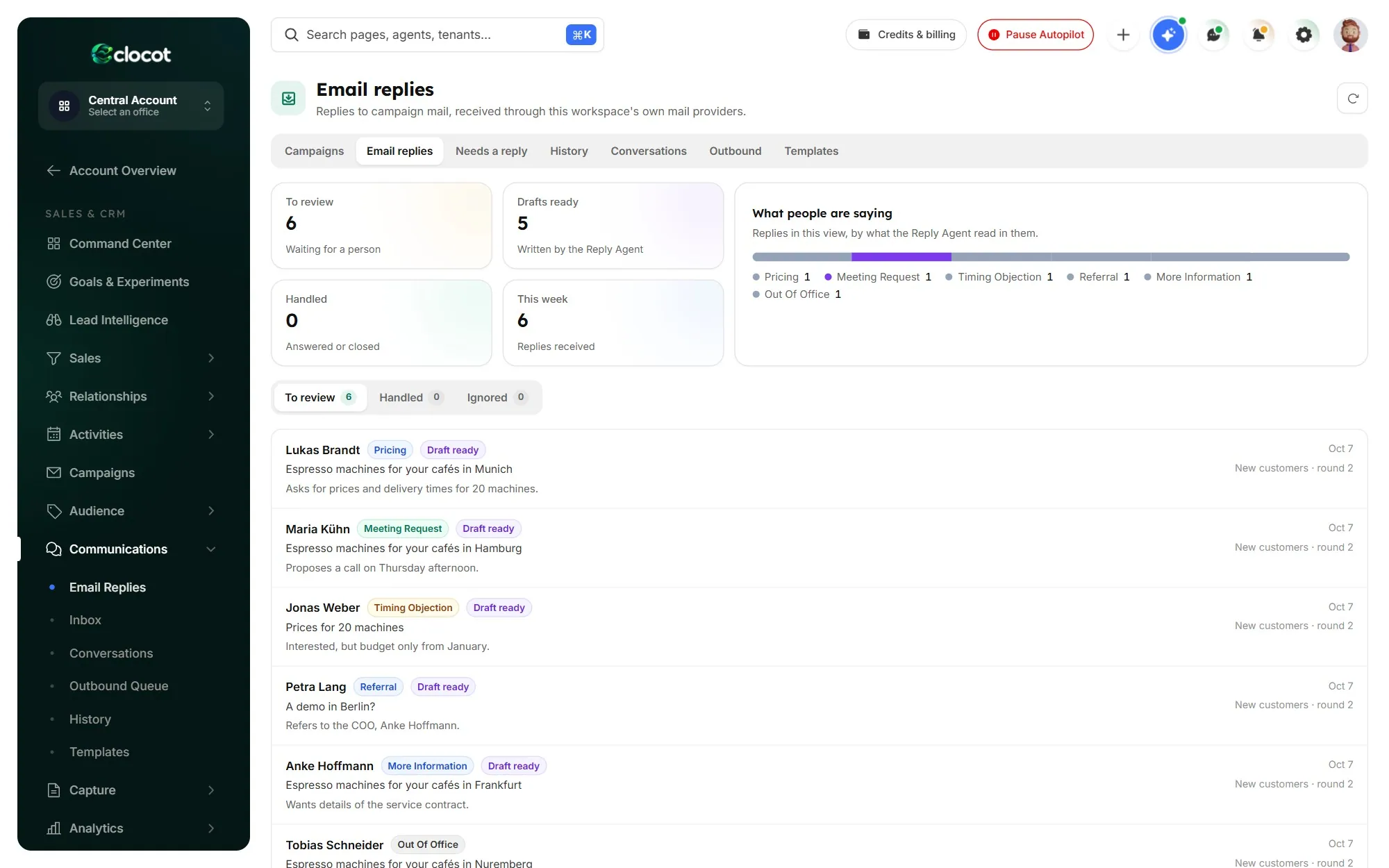
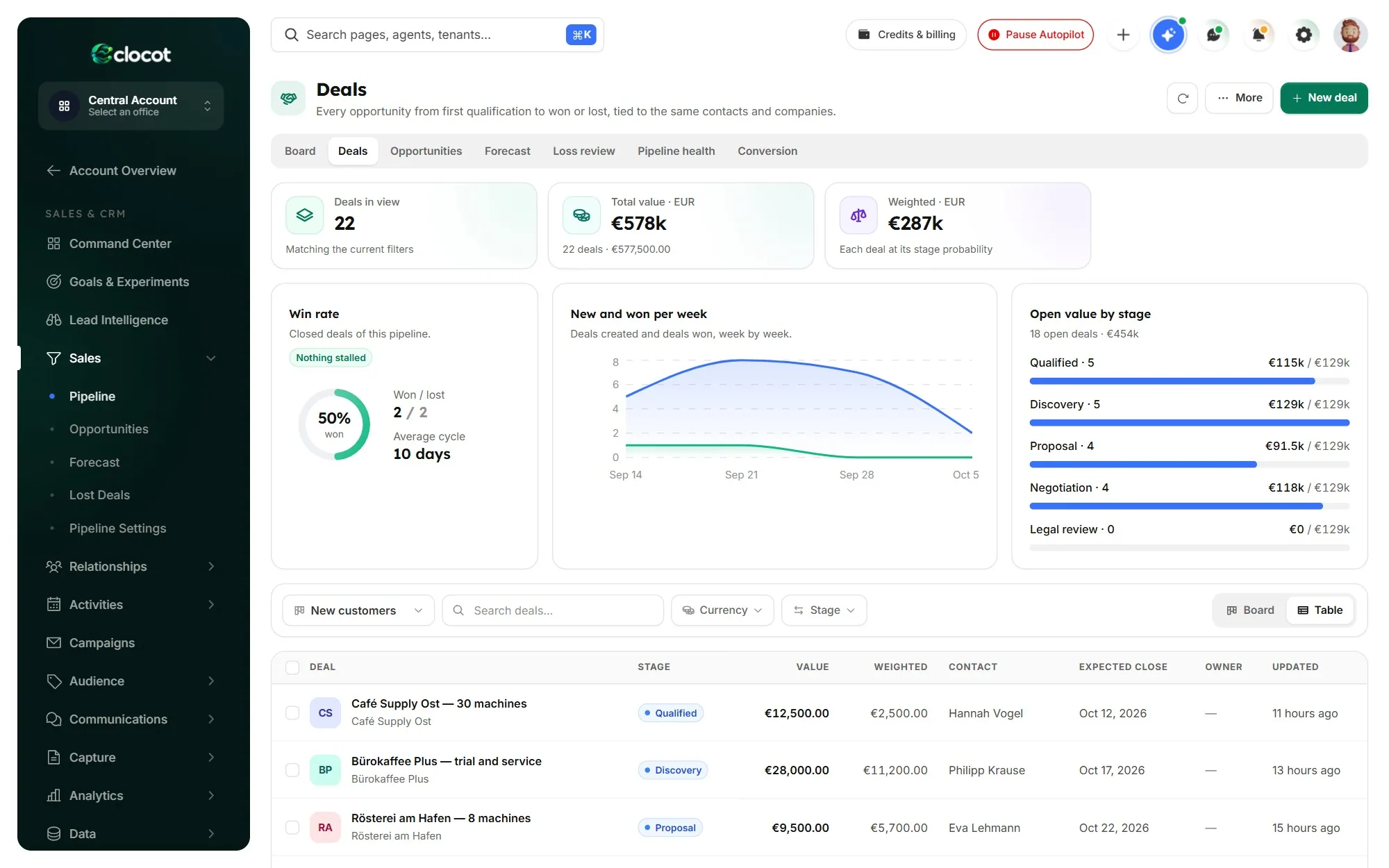
Real screens of the product, with sample data
The week you already know
Outreach works. The hours behind it don’t.
Finding the right person, checking the address, writing something worth reading and following up on time is a full-time job. In most companies it lands on someone who already has one.
- Monday
A morning on company websites builds a list. Too many of the addresses are info@.
- Tuesday
One good email goes out forty times with only the name changed.
- Wednesday
A client calls, a deadline moves, and the follow-ups quietly never go out.
- Friday
A buyer asked for a price on Tuesday. The question is still sitting in a shared inbox.
None of it is hard. All of it is relentless. Hand it to the Office, and keep your judgement for the replies.
Made for
Small and mid-sized B2B companies that win business by writing to other companies, and want it done every working day without a new hire.
Not for
Consumer newsletters, bought lists or phone sales.
One task, start to finish
One sentence in. A working pipeline out.
Every step hands a checked result to the next and leaves a record you can open. You choose which steps wait for your yes.
Example task“Find me 2,000 new customers.”214 / 2,000 · day 9
Plan
Research
Check
Write & send
Replies
Your yes
CRM
Learn
Lead research
Every contact comes with the page that proves it.
The team reads the market from public sources and finds the right person at each company. A name is kept only when a public page names that person, and that page stays attached to the record.
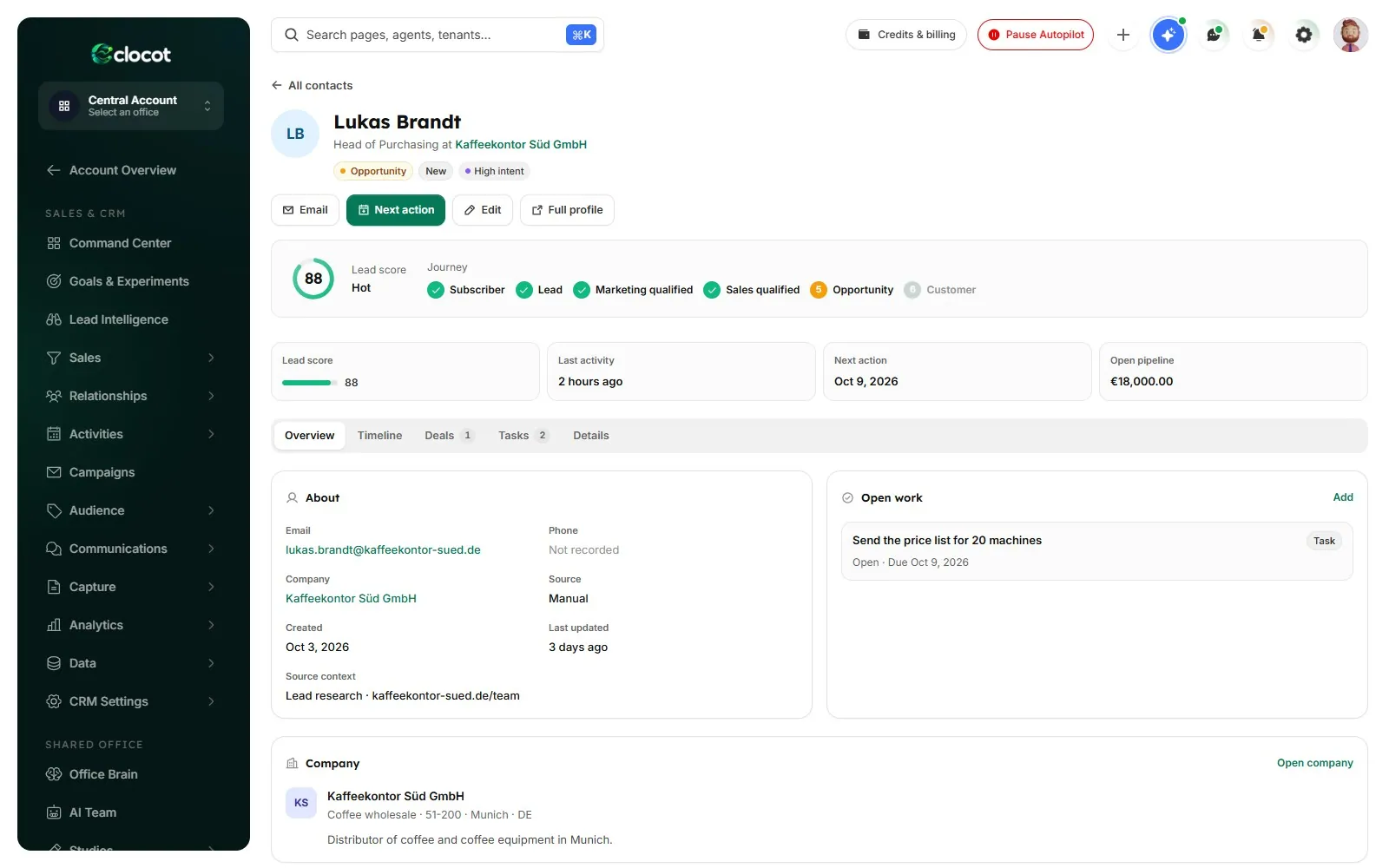
Contact 360
One person on one page: company, role, source, score, deals and every email both ways.
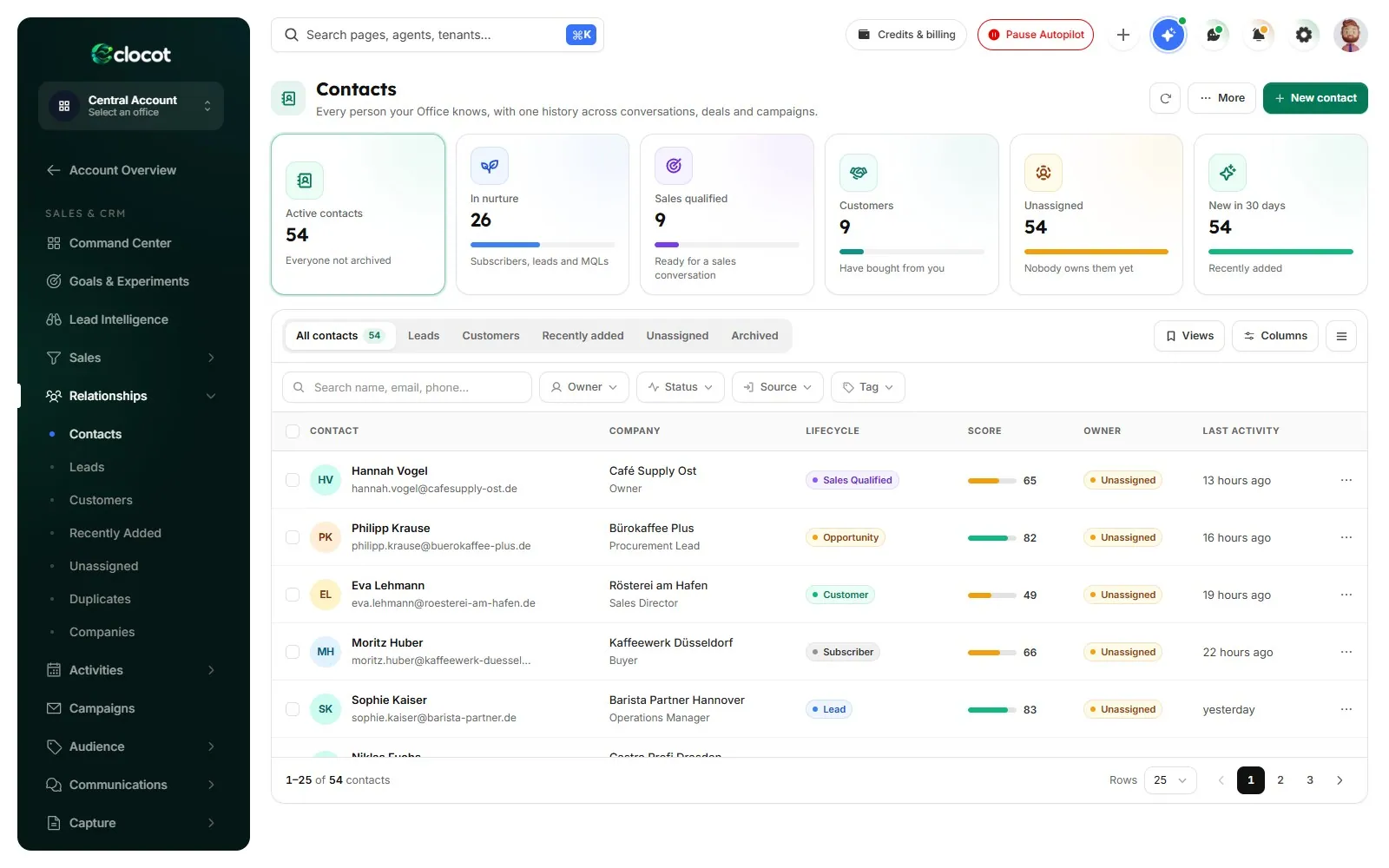
Contacts
Everyone the team found, with status, owner, score and where they came from.
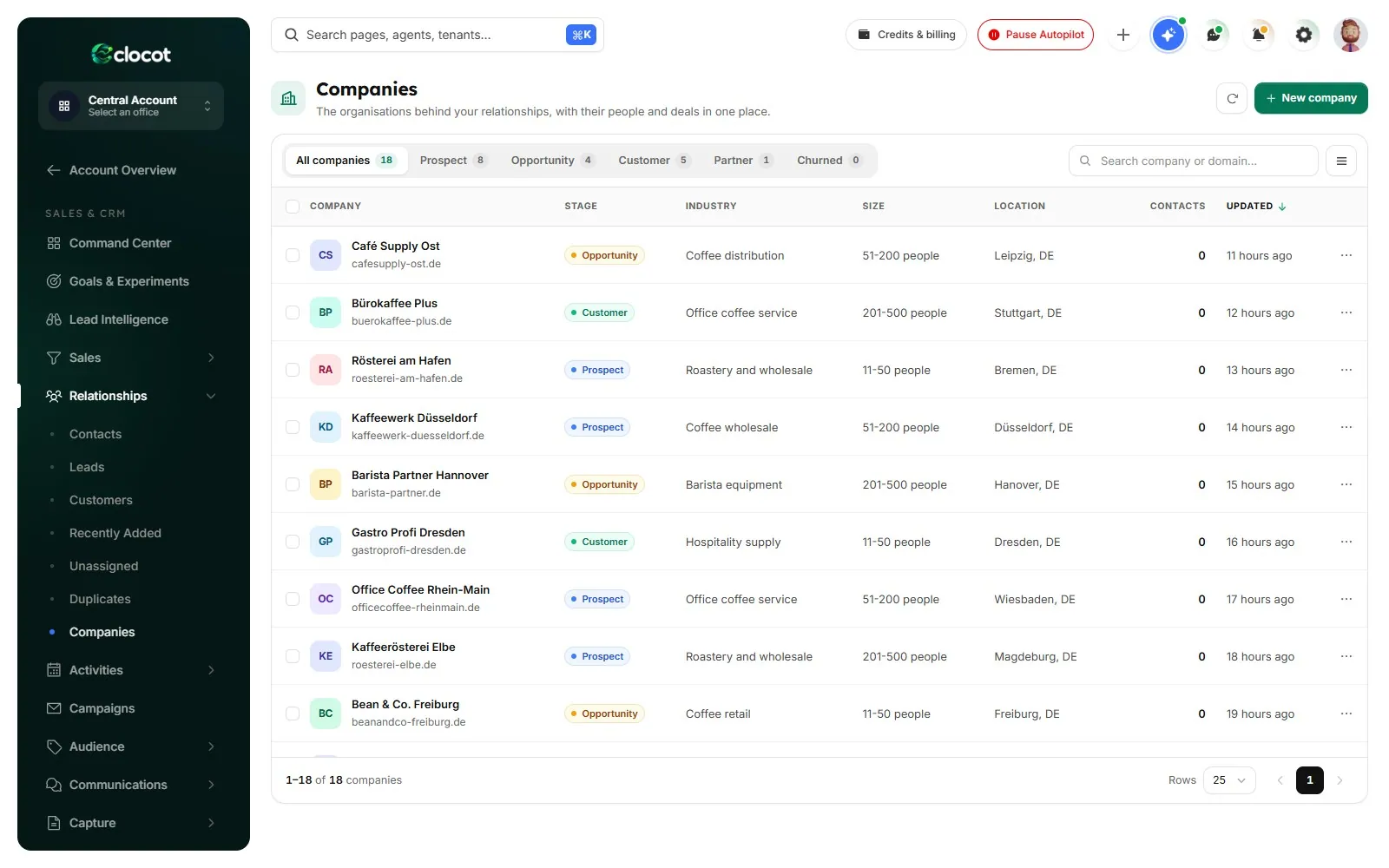
Companies
Every company with its people, open deals and value, kept up to date by the team.
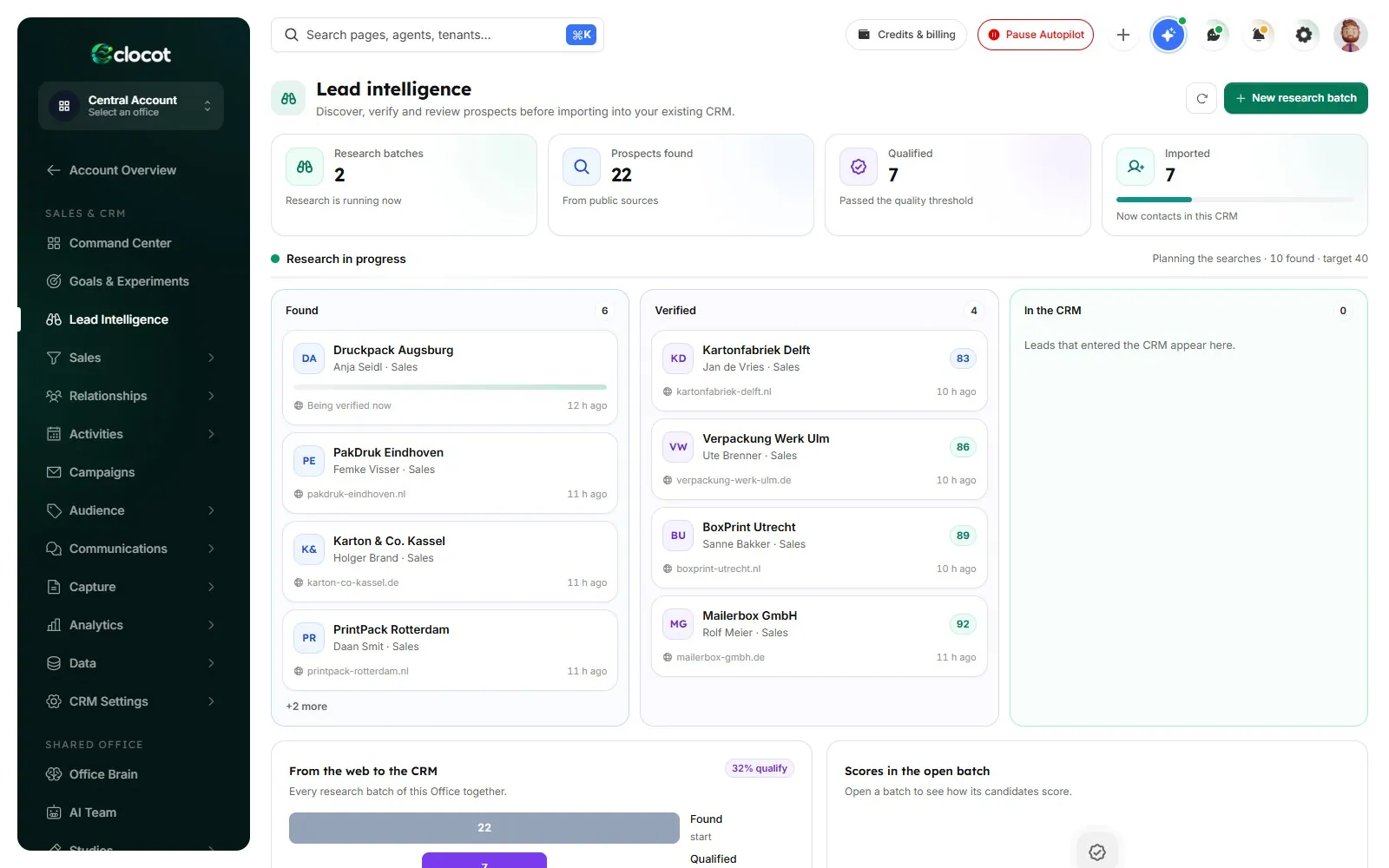
Lead research
Found, then verified: each contact with the page that names them and a quality score.
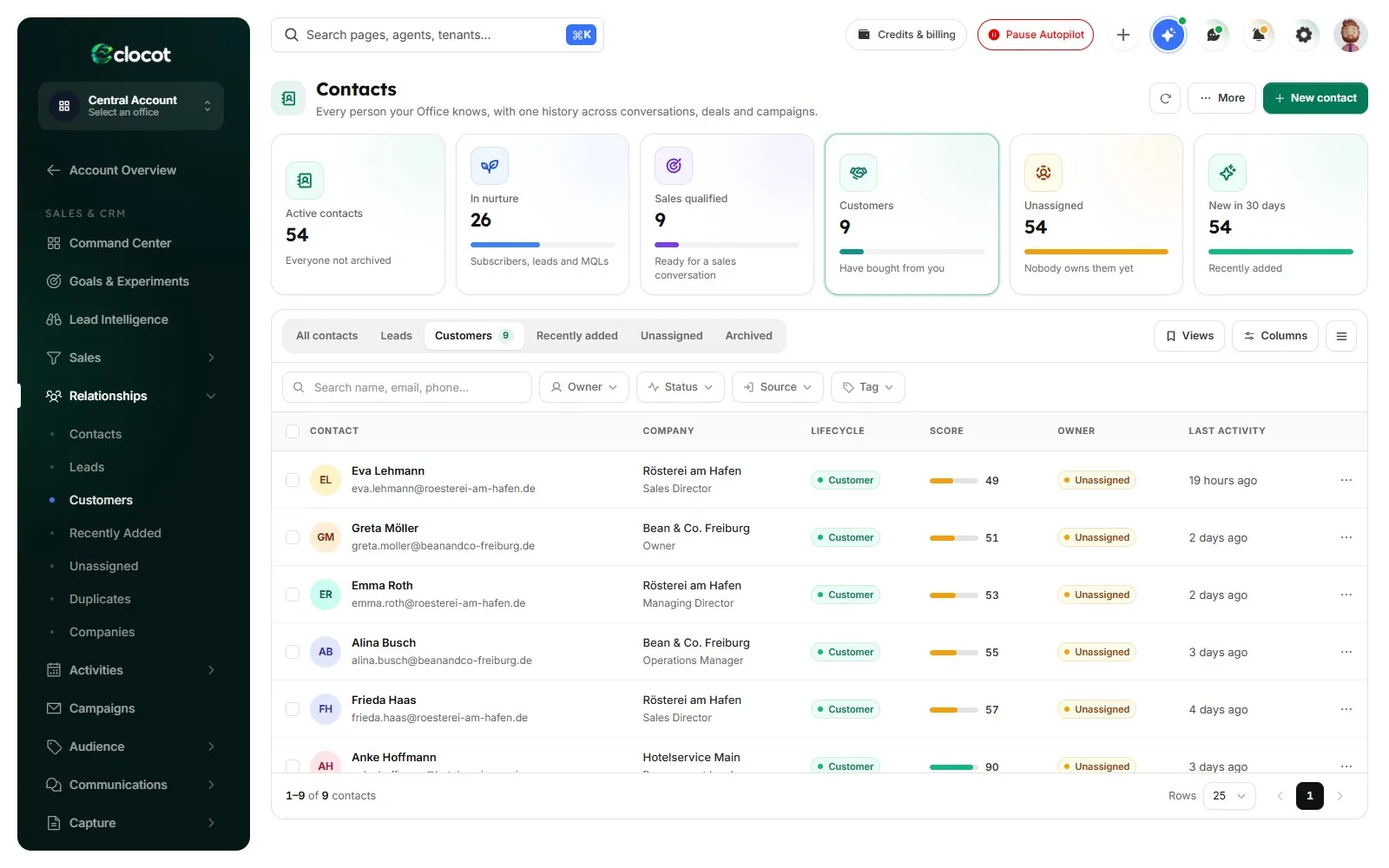
Customers
The people who bought, with their company, score and the last time you spoke.
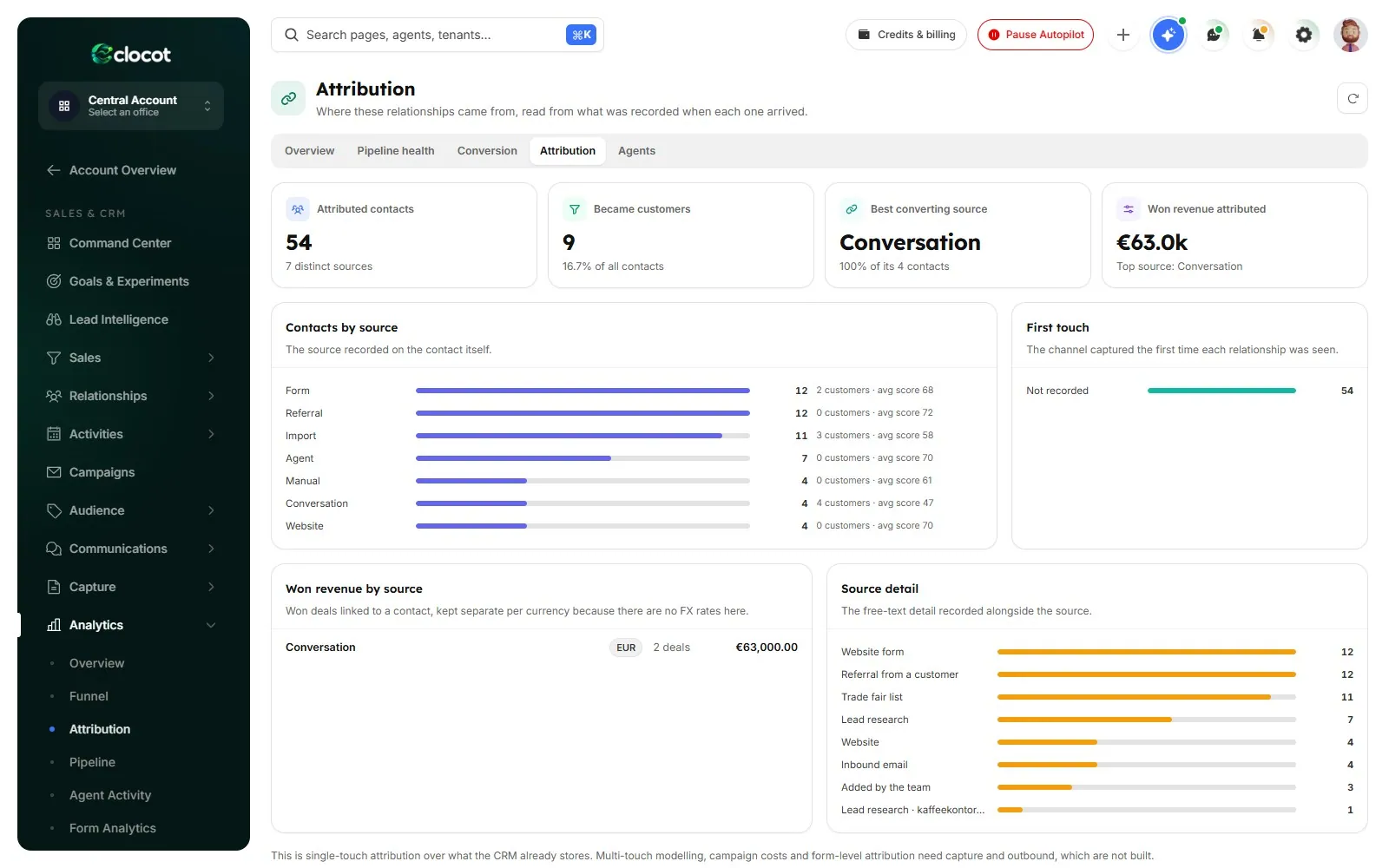
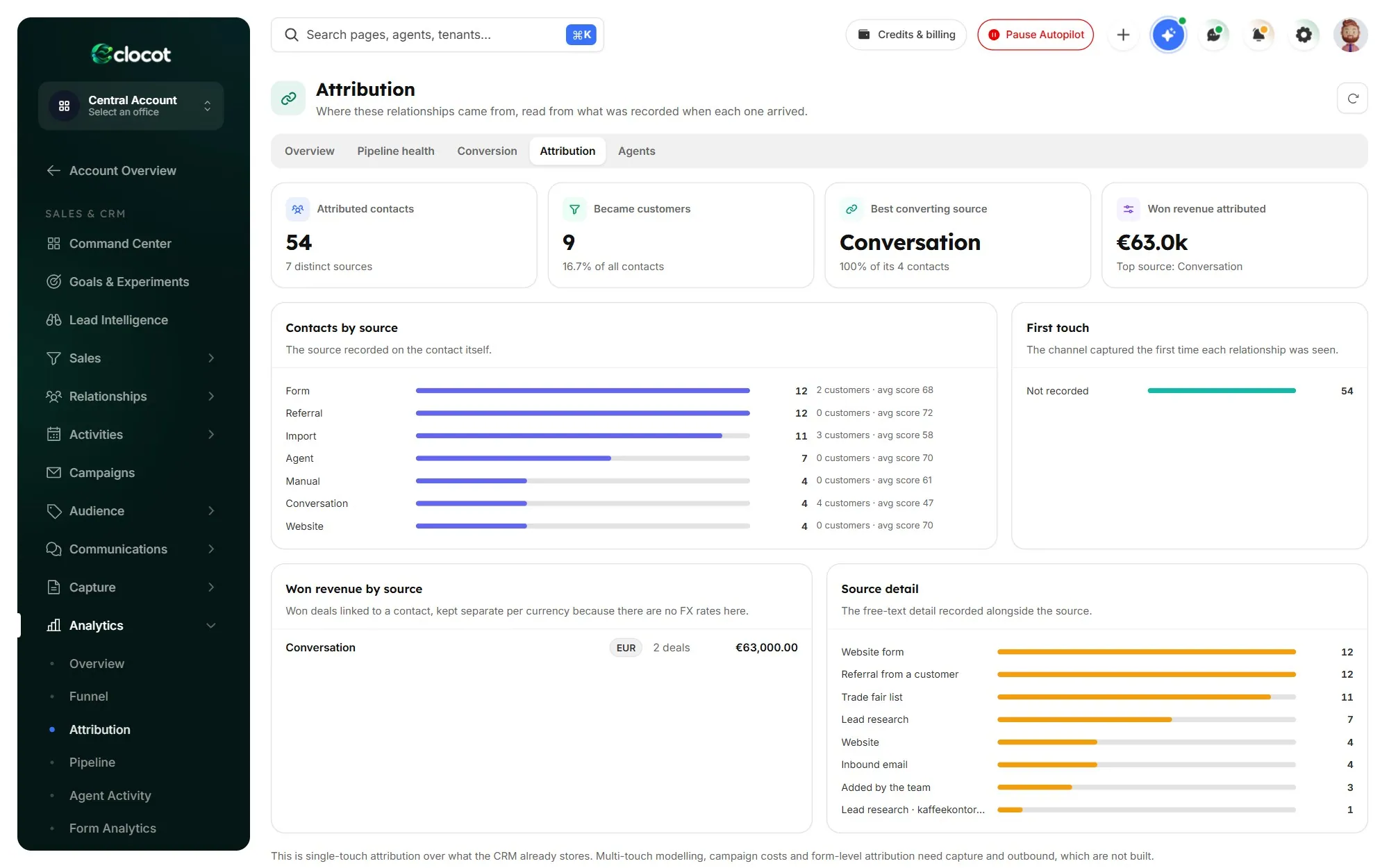
Where they came from
Every contact and every euro won, traced to the source that brought them.
- No source, no contact: a name the page does not show is never added.
- The source page is saved with every contact, so you can check any name yourself.
- Checked before the first email, with info@ and other shared inboxes held back.
Replies
Every answer sorted. Every reply ready. You press send.
The Office reads each answer and files it: pricing, meeting request, objection, referral, wrong person, out of office, unsubscribe. Then it prepares the reply from your offer and your rules, for a person on your team to send with one click.
- 1Sorted by what they ask
Prices, meetings, timing, referrals and out-of-office, labelled the moment they land.
- 2The chasing stops by itself
An answer ends the follow-ups to that person at once.
- 3Your reply, already written
In their language, from your price list and rules. You read it and press send.
Not only sales
Any job that starts with writing to companies.
Find suppliers, recruit partners, fill an event or win back customers who went quiet. Change the sentence, and the plan, the research and the messages change with it.
You hand it the task
“Find me 2,000 new customers for our espresso machines.”
- Researches the market
- Finds the right person
- Checks every contact
It writes, from your mailbox
- To
- Lukas Brandt, Purchasing, Kaffeekontor Süd
- Subject
- An espresso machine for your cafés in Munich
Hello Lukas, Kaffeekontor Süd runs more than a dozen cafés in Bavaria. Our Italian machines start at €1,840 with delivery in three weeks and service included. Worth a short call this week?
- Follow-up on day 3
- Follow-up on day 7
- Stops when they reply
The answer lands, sorted
Example“Interesting. Can you send prices for 20 machines?”
PricingYour reply is ready · you send it with one clickRounds that learn
Each round starts from what the last one proved.
Every round is measured by audience, message, step, day and source. What earns replies stays, what does not changes, and each lesson goes into the Office Brain with its evidence. Below, one example task across three rounds.
Round 1
Find the signal
- Tried
- Two opening emails across cafés, offices, hotels and bakeries.
- Learned
- The shorter opening drew more replies. Bakeries barely answered.
Round 2
Back what works
- Tried
- The shorter opening for everyone, more effort on hotels and restaurants.
- Learned
- Owners answered more often than managers, and early-week sends did better.
Round 3
Aim
- Tried
- Owners first, early-week sends, bakeries paused, the second follow-up rewritten.
- Learned
- Emails went where answers came from, and the lessons are saved for the next task.
Round 3 against round 13.5×
Example only: it shows the method, not a forecast of your numbers.
ExampleYou stay in charge
It goes as far as you allow. No further.
Set the checkpoints, limits and hours once. The Command Center shows where every task stands and what waits for your yes.
- Your checkpoints
Stop before the plan, before new contacts, before the first email, or nowhere.
- Approved means sent
Only the version you approved goes out, word for word.
- Daily limit
You set how many emails leave each day. It stays inside it.
- Working hours
Sending runs on working hours, never in the middle of the night.
- It pauses itself
If unsubscribes or failures pass your limits, it stops and waits for you.
- One Stop button
One press halts the whole Office.
The CRM underneath
A complete CRM that fills itself in.
Every company, person and email the team touches lands in pipelines and deals your people can work from. People and AI share one Task Center, and the executive report puts progress beside cost.
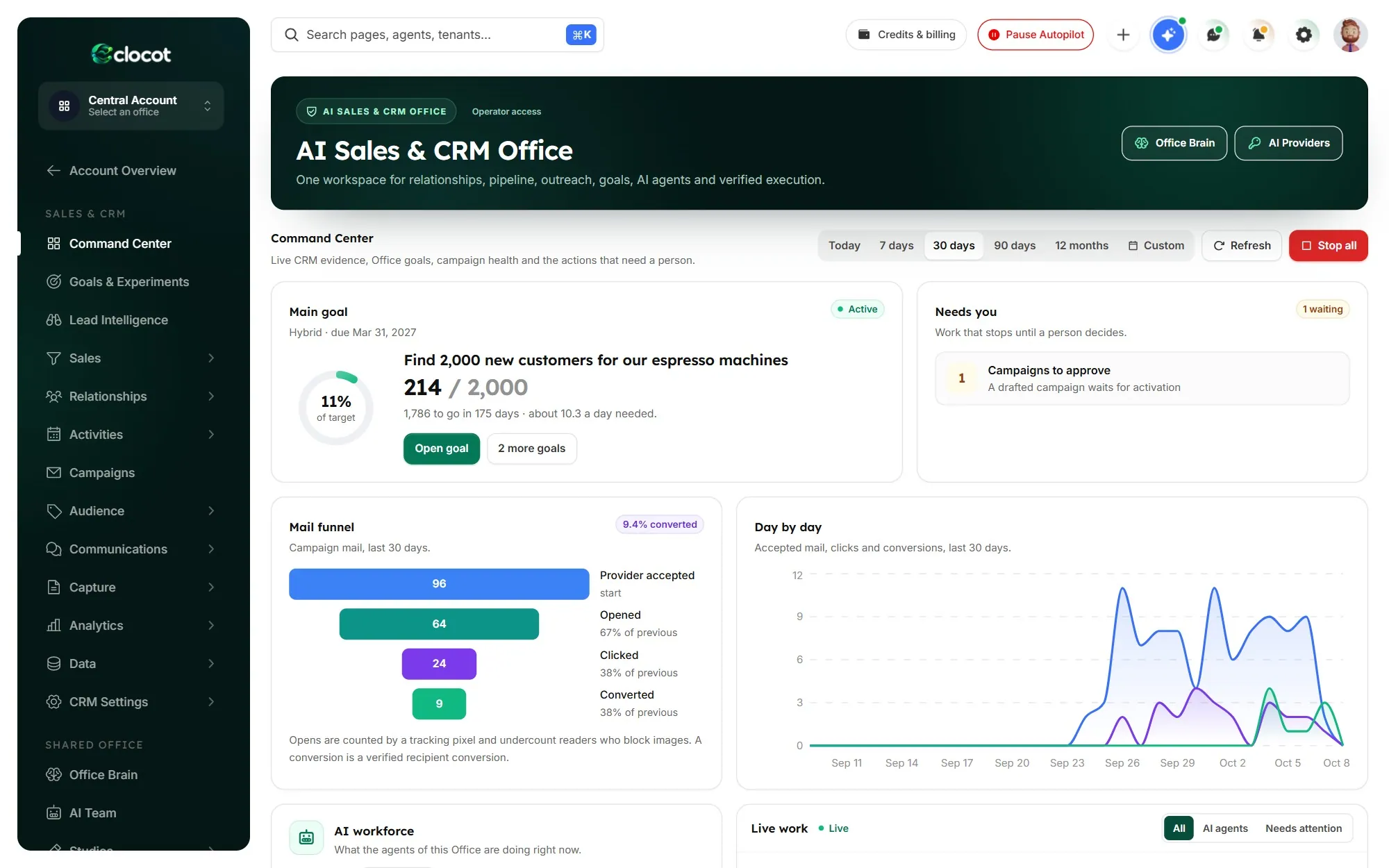
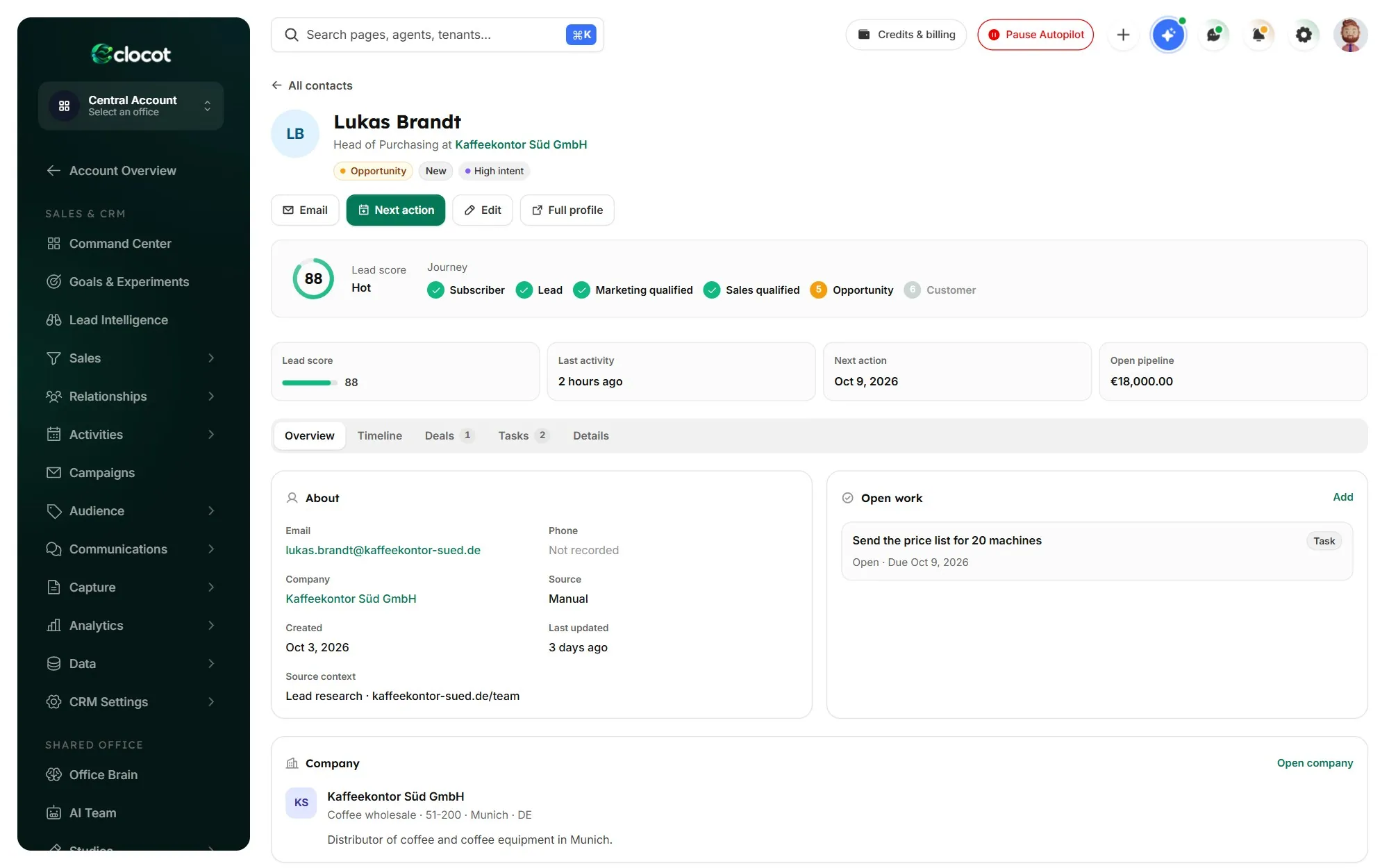
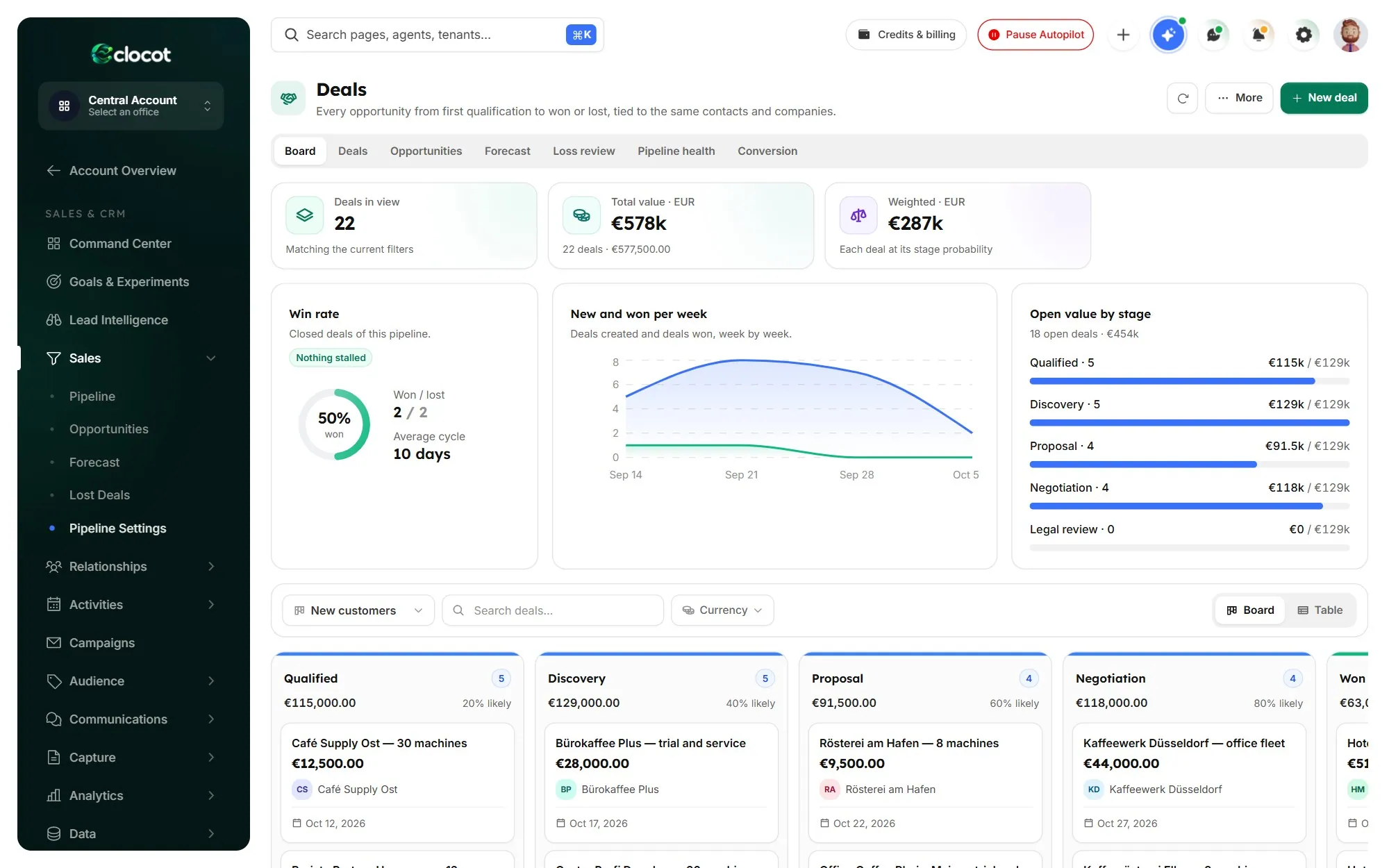
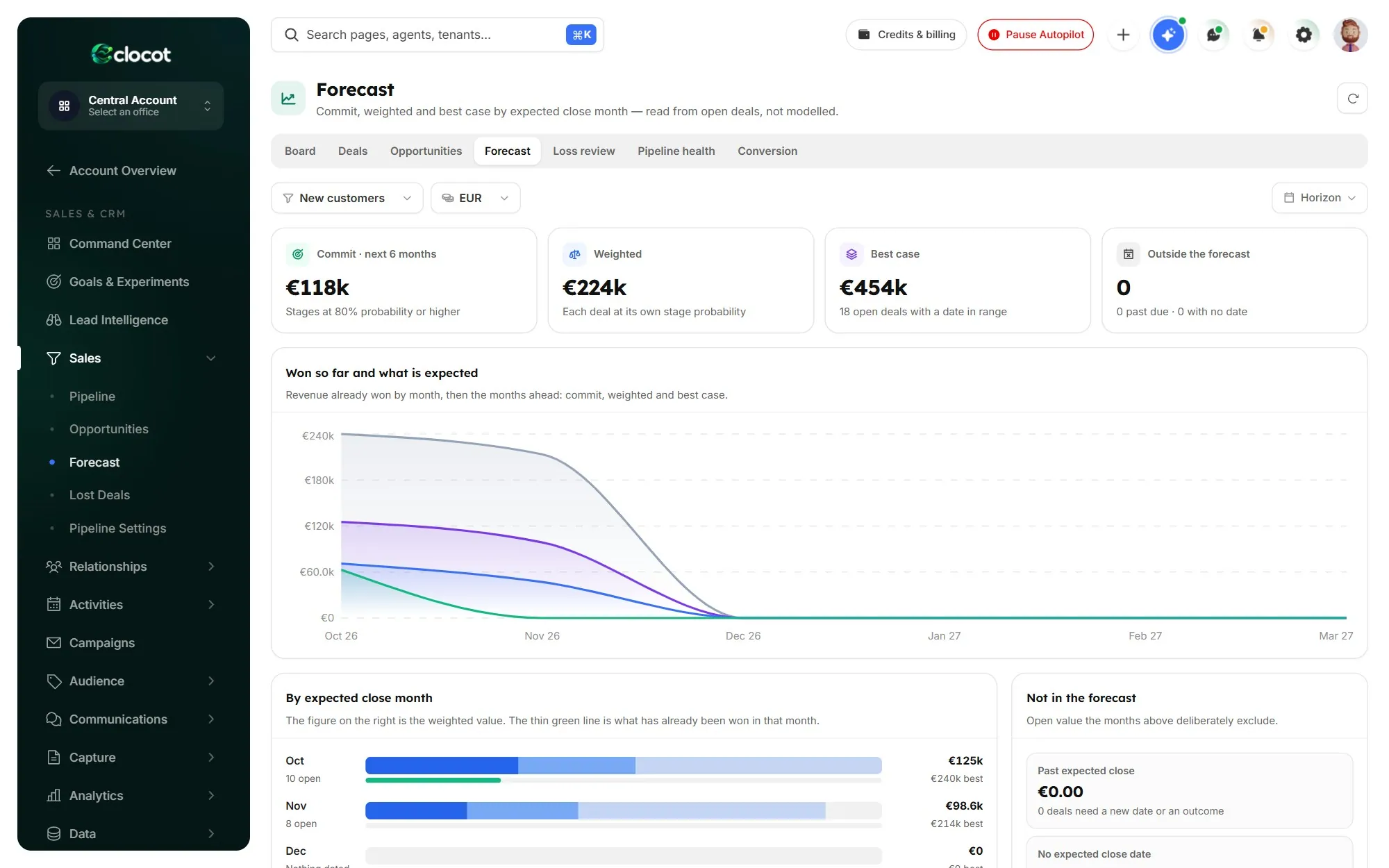
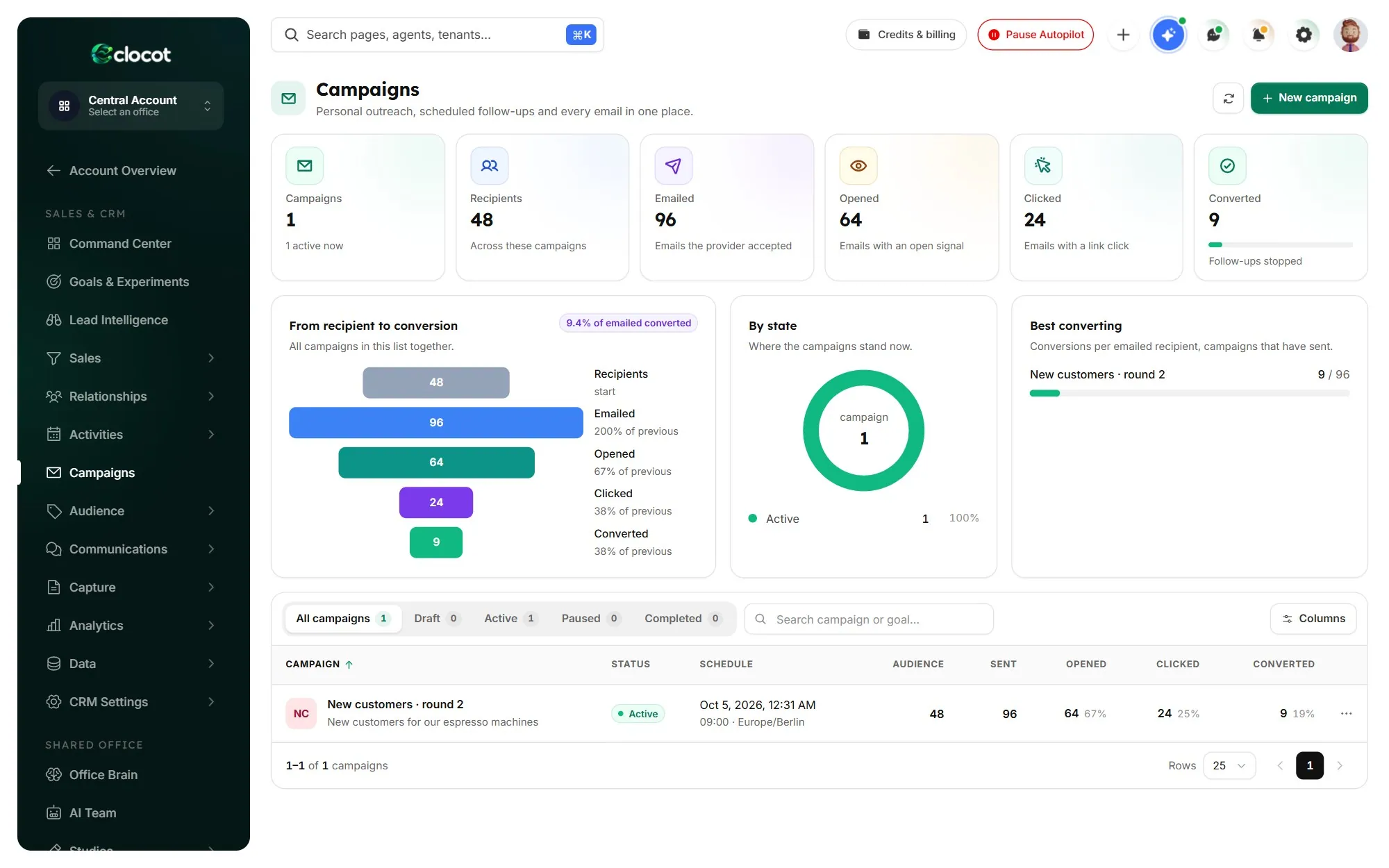
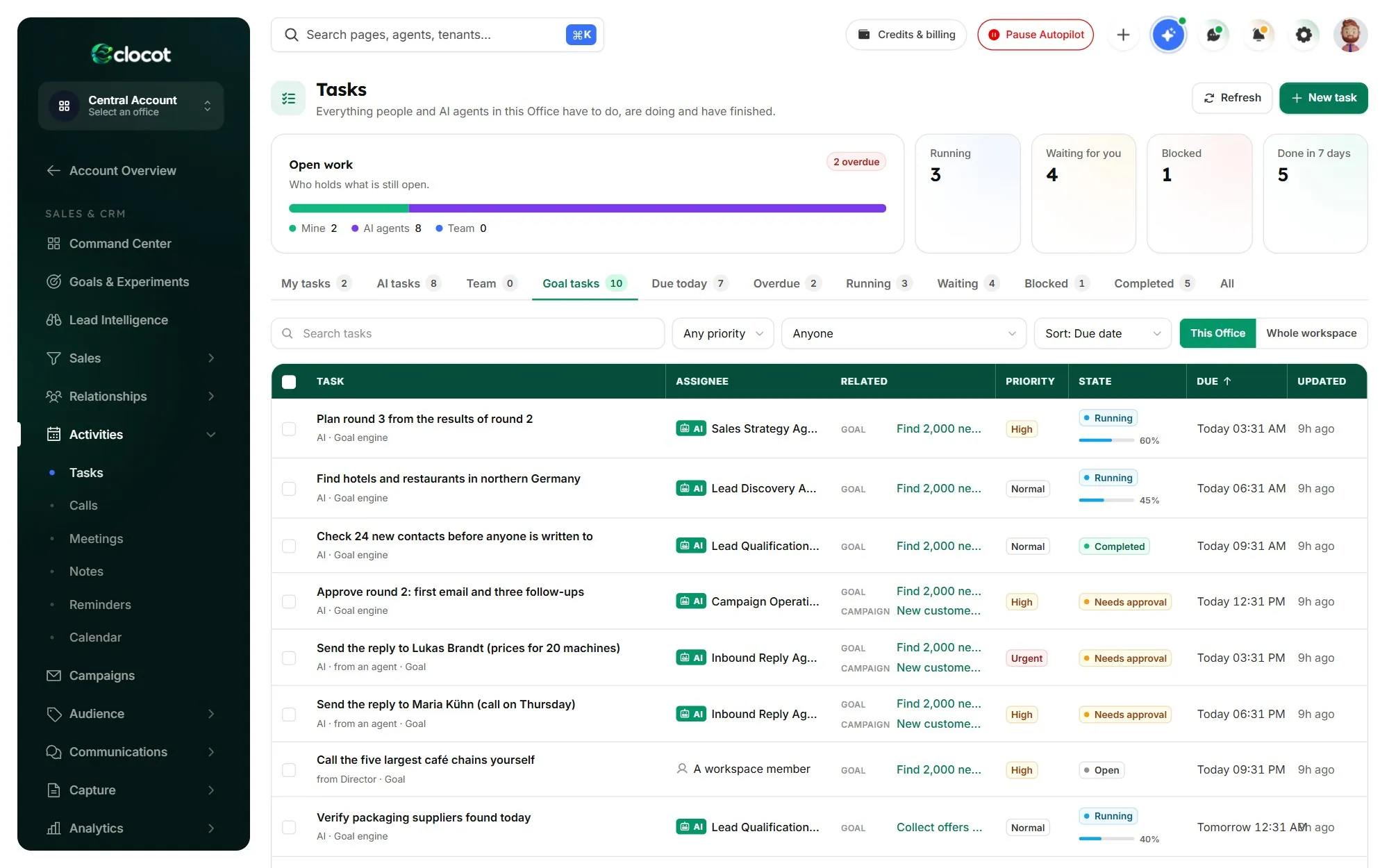
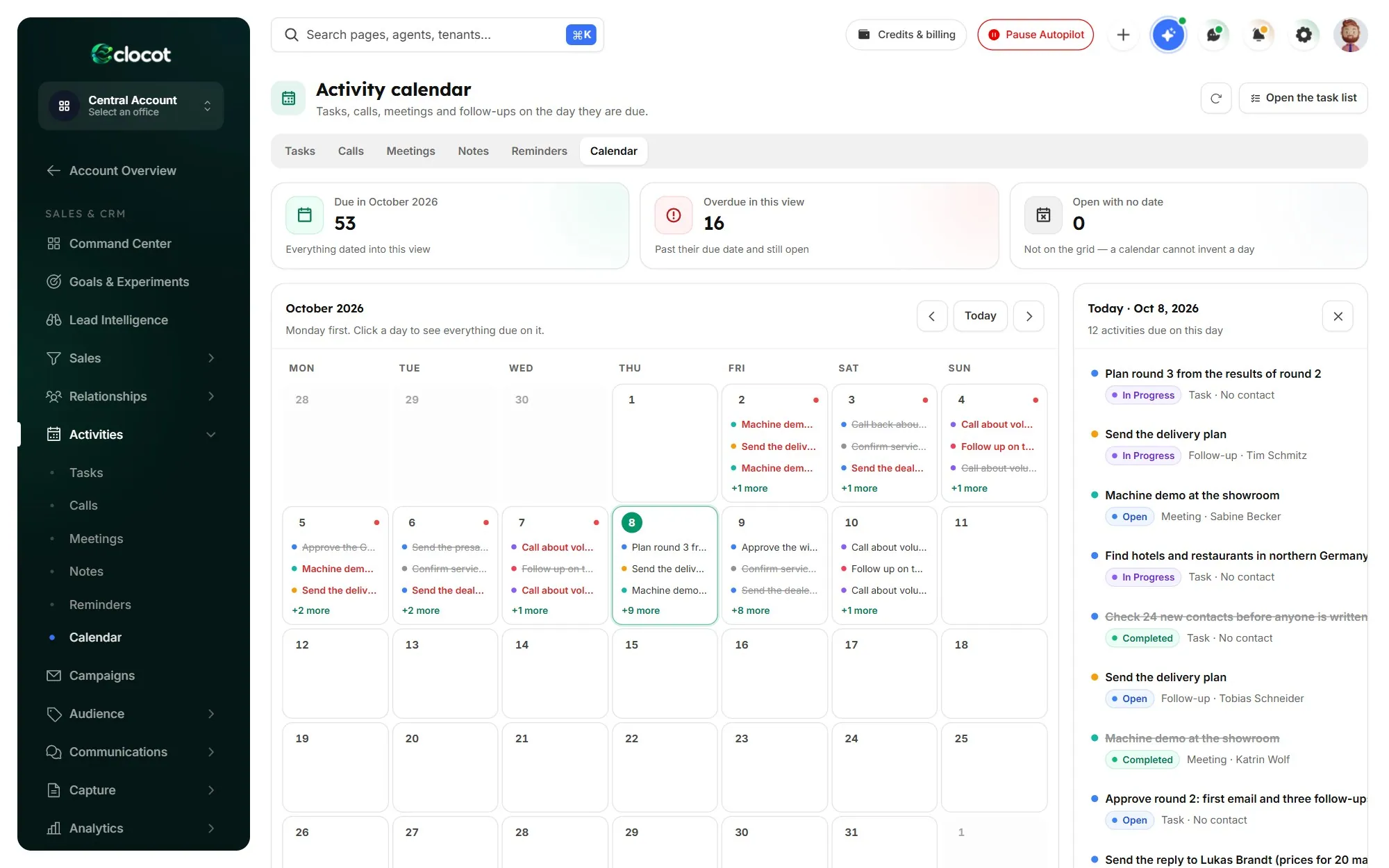
Command Center The goal, what waits for you, and the work in progress.
- Contact 360
Every person, every email and every deal on one page.
- Companies
Accounts with their people, deals and value.
- Deal pipelines
Boards for every way you sell, with stage probabilities.
- Forecast
Weighted value ahead, from the deals you have.
- Campaigns
Sequences and rounds, measured step by step.
- Lead capture forms
Forms for your site that create contacts directly.
- Smart segments
Groups that keep themselves up to date.
- Lead scoring
Who to talk to first, from fit and activity.
- Task Center
People and AI on one list, with approvals.
- Command Center
The goal, what needs you and the work in progress.
- Funnel & attribution
Where deals come from and where they stall.
- Loss review
Why deals were lost, so the next round avoids it.
- Executive report
Progress and cost, written for you.
- CSV import, dry run first
See every change before anything is saved.
- Duplicates & merge
One record for each person and company.
- Custom fields
Shape the CRM to the way you sell.
- Activity calendar
Calls, meetings and follow-ups on the day they are due.
- Replies inbox
Every answer sorted, with your reply prepared.
Included with Founding Partner and Founding Partner Elite
The FrontDesk Office. Your AI reception, in your pocket.
Calls, messages and enquiries that reach your company are answered, summarised and passed on. The sales team keeps working your task; what needs you lands on your phone, and you decide in a tap.
- Every enquiry answered, and the ones that need you summarised in one line
- Meetings booked once you say yes, with the confirmation sent for you
- New leads handed to your sales team, so nothing waits until Monday
Not built yet: it joins your account at no extra cost as soon as it opens. The phone view is illustrative.
Founding places are limited.
When they are gone, the round closes, even before November 8.
Do the math
A salary, a retainer, your evenings, or $44.17 a month.
That work costs you$12,480a year
Founding Partner$530a year
Your numbers, not our promise. It compares the cost of the work, not results.
Buying before it opens
Change your mind until you start using it.
The Founding Guarantee
Change your mind any time before November 8 and you get every dollar back. If your Office is not open that day, you get every dollar back. After it opens you have 14 days: as long as you have not started using it, one email to office@clocot.com gets you a full refund through Stripe.
Once the Office starts working for you, it runs on AI we pay for. From then on you can cancel future renewals at any time.
- Paid through Stripe
Invoice by email. Cancel future renewals whenever you choose.
- Your data, walled off
Each company’s data is isolated from every other in the database.
- Your own mailboxes
Email leaves through your SMTP, Resend, SendGrid, Postmark, Mailgun or Amazon SES.
- Contacts kept from the AI
The AI never sees an email address or a phone number.
- Every run on record
What it did, who approved it and what it cost.
- Honest status
A working prototype today. The production platform ships early 2027.
Founding members use the Office months before the public release, shape what ships with us, and get first access to new Offices as they open.
Founding round
Founding places are limited. The round closes November 8.
When the places are gone, the round closes early. Each package is paid for its full term through Stripe. From 2027 the same packages cost $260, $530, $1,060 and $2,170, and Founding Partner and Founding Partner Elite keep today’s price for life.
Ready on November 8
The AI sales team, research with saved sources, contact checks, sending from your own mailboxes, sorted replies with prepared answers, rounds that learn, the Office Brain and the complete CRM.
Coming next
FrontDesk Office, for calls, messages and enquiries, is not built yet. It joins Founding Partner and Founding Partner Elite accounts at no extra cost as soon as it opens.
- The full AI Sales & CRM Office
- $50 Clocot credit
- The full AI Sales & CRM Office
- FrontDesk Office included
- $100 Clocot credit
- This price for life
- The full AI Sales & CRM Office
- FrontDesk Office included
- $250 Clocot credit
- This price for life
Paid through Stripe · Invoice by email · Cancel future renewals any time. Prices exclude applicable taxes; any required tax is added at checkout.
Before you claim your place
Plain answers.
Can I get my money back?
Yes, until you start using it. Change your mind any time before November 8, 2026, or within 14 days after it opens as long as you have not started using it, and one email to office@clocot.com gets you a full refund through Stripe. If your Office is not open on November 8, 2026, you are refunded in full. Once it works for you it runs on AI we pay for, so from then on you cancel future renewals instead.
Is it allowed to write to the people it finds?
Rules differ by country, so check them for each market before you include it in a task. Germany, for example, usually requires prior consent even for business-to-business email. The Office keeps the public source of every contact and honours every “please stop” at once, but this is not legal advice.
How much of my time does it take?
You write the task, choose where it stops for your approval, and send the replies it prepares. Everything between those points is the Office’s work. Fewer checkpoints take less of your time; more let you see every step.
Do I have to leave my current CRM?
The Office keeps its work in its own complete CRM, so nothing has to move on day one. When you want everything in one place, bring your companies and contacts in by CSV, with a dry run that shows what will change before anything is saved.
Will it make up contacts?
No. A person is kept only when the public page they came from names them, and that page is saved with the contact. Every contact is checked before anyone is written to.
Does it use Clocot’s AI or my own keys?
Either. It runs on Clocot’s AI, paid from the credit in your package, or on your own Anthropic, OpenAI, Google or Amazon Bedrock keys.
What is FrontDesk Office?
A second Office that answers calls, messages and enquiries, summarises them and passes them on, with decisions on your phone. It is not built yet. It joins Founding Partner and Founding Partner Elite accounts at no extra cost as soon as it opens.
When do I get access, and is it finished?
Your Office opens on November 8, 2026, the day the founding round closes. Clocot is a working prototype today, and the production platform ships in early 2027. Until you start using it, you can still change your mind and get a full refund.
Will it hurt my domain?
It sends from your own mailboxes, on working hours, inside the daily limit you set. Every contact is checked first, shared inboxes are held back, and it pauses itself if unsubscribes or failures pass your limits. No tool can promise deliverability, but these are the habits that protect a domain.
What do I need to start?
A mailbox on SMTP, Resend, SendGrid, Postmark, Mailgun or Amazon SES, your website and files, and one sentence describing the customers you want. The Office Brain reads your site and files to learn your offer, audience and voice. The AI can run on your package’s Clocot credit, so no AI account is required.
Does it reply on its own?
No. It reads and sorts every answer and prepares a reply from your offer and your rules. A person on your team reads it and sends it with one click.
What if the first approach does not work?
Then the next round changes it. Each round is measured by audience, message, step, day and source; what works stays and what does not is changed, until your deadline or limits are reached. Every lesson is saved in the Office Brain with its evidence.
What does “price for life” mean?
On Founding Partner and Founding Partner Elite, every renewal stays at the price you pay today ($530 every year and $880 every 2 years) for as long as you keep renewing. It does not move to the 2027 prices of $1,060 and $2,170.
How do billing and cancelling work?
You pay for the term through Stripe, and the invoice arrives by email. You can cancel future renewals at any time.
November 8: your Office starts work, and founding prices close.
--days--hours--min--secFounding places are limited, and when they are gone the round closes. Change your mind before you start using it, and one email to office@clocot.com gets you every dollar back.
AI Sales & CRM OfficeLimited places · from $36.67 a month